
Dahua RTSP stream VLC setup allows users to stream live video from Dahua IP cameras directly to a media player like VLC. This guide provides step-by-step instructions on setting up and accessing Dahua RTSP streams using VLC Media Player.
Before you begin, ensure you have the following:
Here are some common RTSP URL formats for accessing a Dahua IP camera stream:
Main Stream:rtsp://admin:admin123@10.1.1.14:554/cam/realmonitor?channel=1&subtype=0
Sub Stream:rtsp://admin:admin123@10.1.1.14:554/cam/realmonitor?channel=1&subtype=1
Third Stream (if available):rtsp://admin:admin123@10.1.1.14:554/cam/realmonitor?channel=1&subtype=2
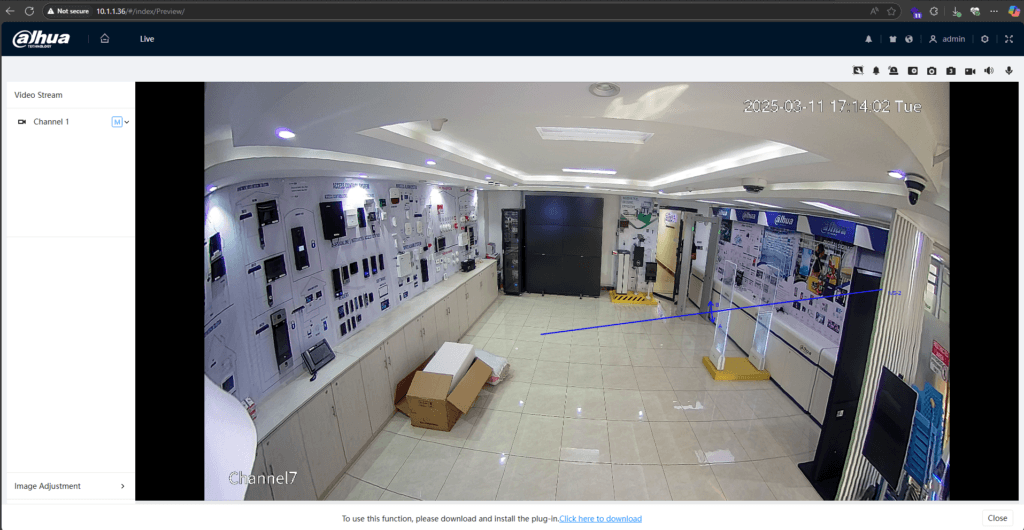
Follow these instructions to stream RTSP video using VLC:
Go to the VLC Media Player Homepage
Download and install VLC for your operating system.
Launch VLC Media Player.
Click on Media → Open Network Stream (or press Ctrl + N).
In the Network tab, input the Dahua RTSP stream URL (refer to the examples above).
Ensure you enter the correct IP address, username, and password (if required).
Click the Play button.
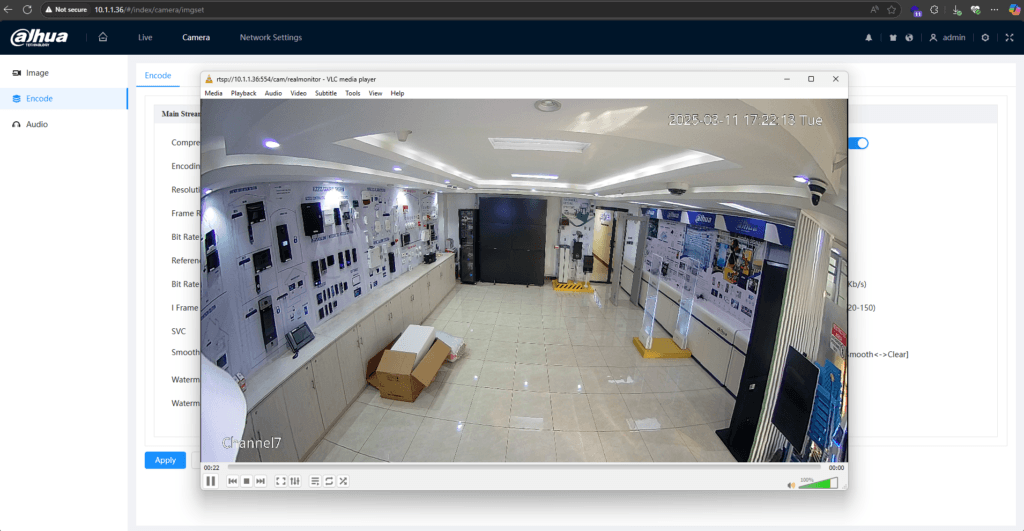
The live stream from your Dahua IP camera should now display in VLC.

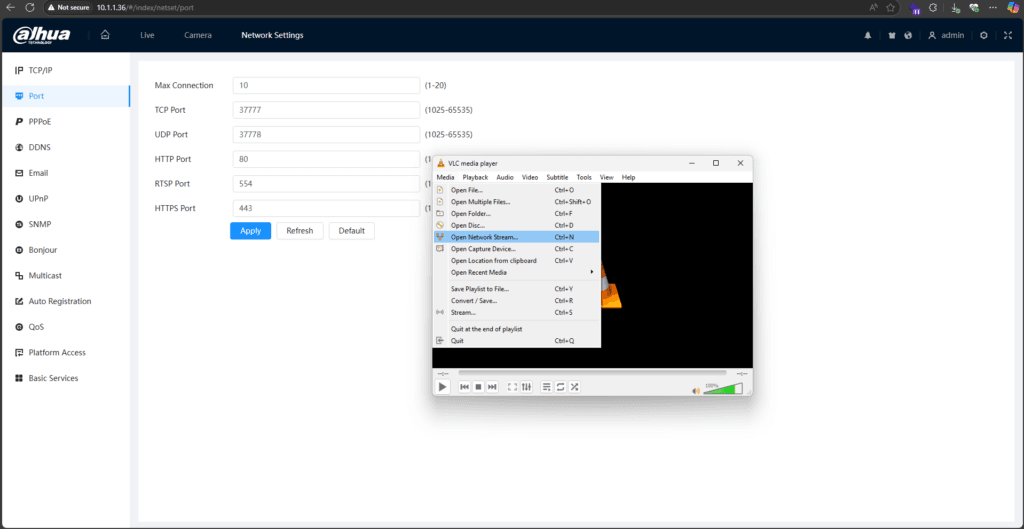

Each Dahua RTSP URL follows a specific format:
rtsp://<username>:<password>@<IP>:<port>/cam/realmonitor?channel=<channel>&subtype=<subtype><username>: Camera login username.
<password>: Corresponding password (avoid special characters like #).
<IP>: The IP address of your Dahua IP camera.
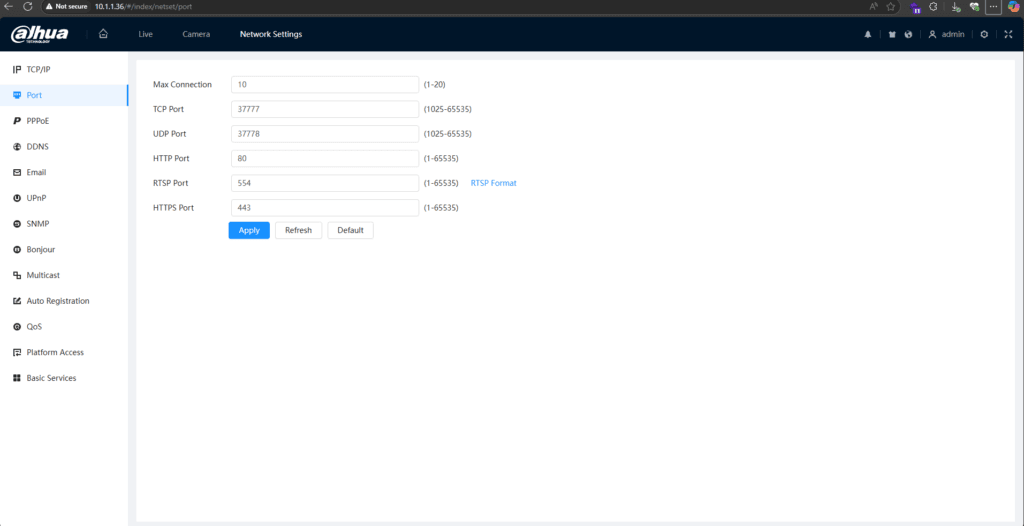
<port>: Default is 554 (omit if unchanged).
<channel>: Camera channel number (1 for most cases).
<subtype>: Stream type (0 for main stream, 1 for sub-stream, 2 for third stream).

If streaming the sub-stream from channel 1, the URL would be:
rtsp://admin:admin123@10.1.1.14:554/cam/realmonitor?channel=1&subtype=1Transmission Modes: Dahua RTSP supports both TCP and UDP.
Authentication Methods: Basic and Digest authentication are supported.
Changing RTSP Port: If the RTSP port is modified, update the URL accordingly.
Most Dahua IP cameras allow users to check the RTSP port in the web interface. Log in to your camera’s admin panel and locate the RTSP settings under the network configuration section.
Using RTSP with VLC is a simple and effective way to stream live video from your Dahua IP camera. By following the steps outlined above, you can set up and access your camera feed seamlessly. If you encounter issues, double-check your RTSP URL syntax, authentication details, and network settings.
For further assistance, refer to VLC’s official documentation or consult Dahua’s support page.
If you’re stuck or need additional assistance, feel free to email at hello@mwando.co.ke or WhatsApp at +254712724949.
Learn more about me or view more inspiring stories and educational content here.
9 Comments
zulacasinologinMarch 5, 2025
zulacasinologin, easy to get into, not bad, a solid try for any on the go gamer, if you want to try it out let me know! zulacasinologin
n188appMarch 5, 2025
N188app, mobile gaming here, alright! The app works good and if you’re on the go a LOT like me, its an easy win but is it worth that? Probably. n188app
888slots77March 5, 2025
888slots77, yeah, pretty straightforward. Lots of slots, like the name says. If you’re a slot head, give it a whirl. I will say there is a variety on the site. Here’s the link 888slots77
1x betMarch 5, 2025
If you’re looking for action, gotta check out 1x bet. They’ve got it all. Here’s where I’ve been hanging out: 1x bet
5mblinkMarch 5, 2025
Honestly, 5mblink has been saving my butt getting to the stuff I need. No BS, just quick access. Deffo worth a look: 5mblink
888pcomMarch 5, 2025
Been checking out 888pcom lately. Seems like they’re trying to update their platform. Hope it gets better because the old site felt a little outdated. Check it out yourself at 888pcom.
id888casinoMarch 5, 2025
id888casino, eh? Not bad! Decent selection, good user experience. Might be a good choice for your chill nights. Check it out for yourself: id888casino
jili88phcomappMarch 5, 2025
Heard about jili88phcomapp? Gave it a try, and it’s alright! The app runs smoothly, which is a huge plus. If you’re looking for convenience, this might be your spot. Learn more here: jili88phcomapp
aaajilinetMarch 5, 2025
Was looking for somthing new and landed on aaajilinet. The look and feel is definitely modern. Check it out aaajilinet and let me know if it lives up to the hype!